When a restaurant location places an order to a commissary or other designated supply location, the order goes through the following steps:
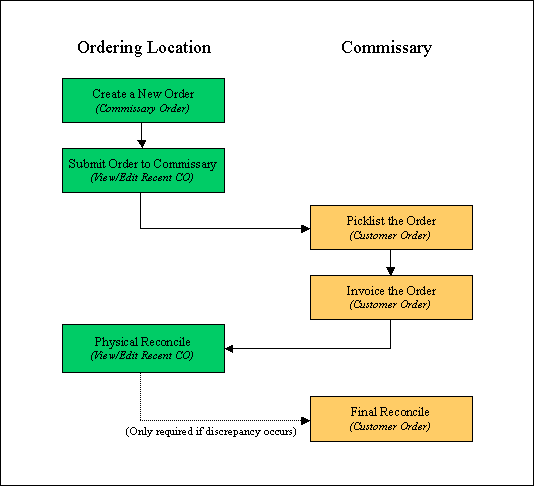
- A user at the ordering location selects Create Commissary Order under the Purchasing menu to Create the order; product quantities use "Issue Unit 1". The order can be submitted at this time.
- If the order is saved prior to submission, a user can edit and then Submit the order using the Recent Commissary Orders screen.
- A user at the commissary/supply location will select View Customer Order Summary under the Sales menu from which to Picklist the products and prepare them for shipment to the ordering location.
- A user at the commissary/supply location will then Invoice the order and print the shipping document that accompanies the order. During this stage, the user enters the quantities actually shipped. Once the order is invoiced, the product quantities are subtracted from the supplier’s inventory and designated as “In Transit.”
- When the shipment arrives at the ordering location, a user there will select the Recent Commissary Orders screen from which to Physical Reconcile the order, entering the quantities actually received.
- Depending on the preference settings, a user at the commissary/supply location may have to Final Reconcile the order if there is a discrepancy between the Invoice Quantity and the Physical Quantity during the Physical Reconcile.
 Related Topics