Update By Exception
Using By Exception lets you fill in the Inventory Unit "Quantity" column for each product in an inventory without entering each quantity manually. A Closing Method is assigned for each product type in each storage location, and it is the closing method that determines which quantity will be used when updating inventory "by exception."
The 4 Product Types are:
- Stock: Generally used for products that are counted on a regular basis, such as food and liquor.
- Non-Stock: Generally used for products that are counted less frequently, such as china or equipment.
- Sales: Generally used for recipe products that are sold to consumers.
- Intermediary: Generally used for recipe products that are used only within other recipes, such as marinara sauce.
The 4 Closing Methods are:
- Beginning: Physical quantity will be set to the quantity from the beginning of the post period.
- Book: Physical quantity will be set to [book - in transit].
- Last Count: Physical quantity will be set to the last physical quantity saved.
- Zero: Physical quantity will be set to 0.
Example:
Milk is assigned to the product type "Stock." It is held in two storage locations: beverage cooler and cold storage.
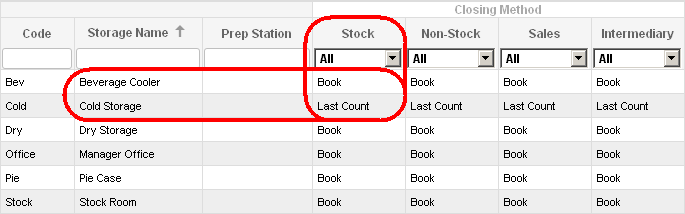
When "By Exception" is clicked, the milk count for the beverage cooler will match the book quantity, and the milk count for cold storage will match the last saved physical quantity. "By Exception" only updates null quantities; any counts entered manually will not be changed.
Click HERE to learn about preferences that govern what occurs when "By Exception" results in a negative quantity for one or more products.
 Related Topics