Negative Quantities "By Exception"
When the quantity calculated
- Allow Save of Negative Physical Inventory – This setting determines IF inventory counts that include negative physical quantities are allowed to be saved. If this is checked, users will be allowed to save inventory counts that include negative physical quantities; if it is not checked, inventories cannot be saved until all physical quantities are greater than or equal to zero. Checking this preference also allows the creation of inventory adjustments that make the on-hand quantity of a product negative.
- The Physical Storage Quantity section determines HOW negative quantities should be handled during inventory "By Exception".
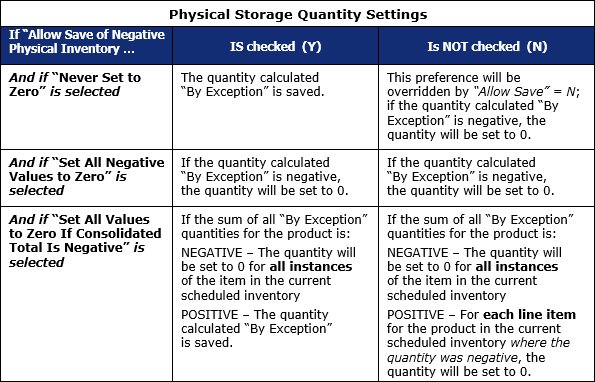
Note: The "Set All Values to Zero if Consolidated Total is Negative" preference requires the application to check theoretical "By Exception Quantity" for the product in ALL storage locations and for ALL lots, even though some of those instances might not be contained in the current scheduled inventory.
 Related Topics