Determining the Settings for Net-Chef Prep
If a location produces its recipes on site using Net-Chef Daily Prep, the location MUST be added to the “Location” tab of the Recipe Details screen (as shown below) and the Production Type MUST be set to “Production.” This indicates that the recipe will be produced using ingredients from the location. POS Decrement MUST then be set to “Item”, since the recipe will only be sold as a finished product; the components will be depleted during the prep process.
Click HERE to see a table summarizing the Production Type and POS Decrement settings.
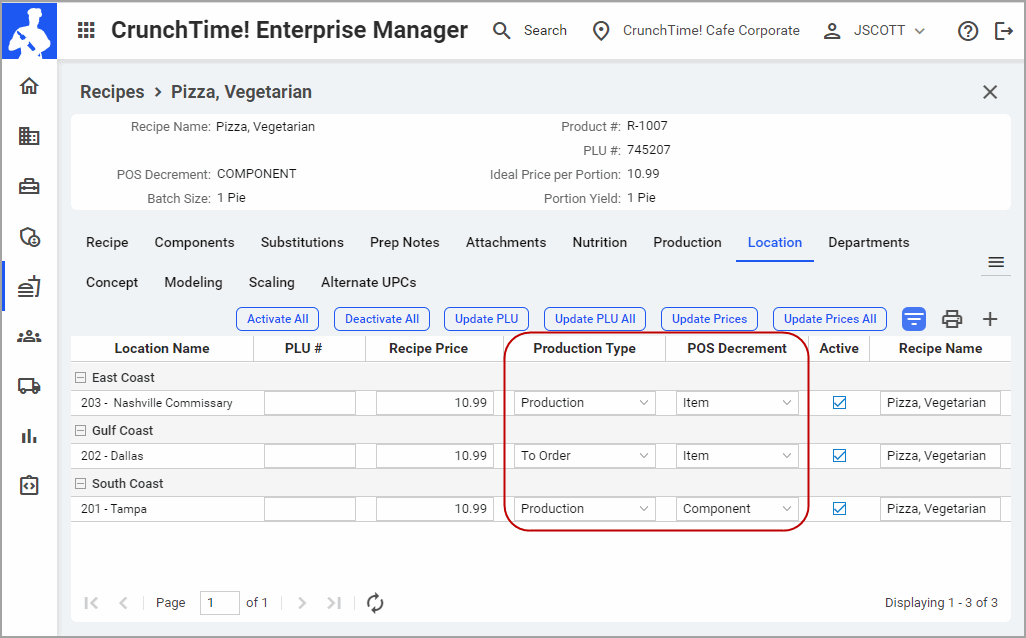
Q: What do the settings in the screen above indicate about each location?
A: Based on the “Production Type” and “POS Decrement” settings at each location, it can be seen that:
- The Nashville Commissary is producing the recipe on site using the Daily Prep module. Here, the components are depleted during prep and the finished recipe is added to inventory, so when/if sold via POS the finished recipe is depleted on a per-portion basis and the Issue Cost is used for the recipe cost.
- The Dallas location receives the finished recipe from elsewhere, most likely the Commissary. When this location sells the recipe, it is depleted on a per-portion basis and the Issue Cost is used for the recipe cost.
- The Tampa location is producing the recipe on-site but is not using thethe Daily Prep module, so the finished recipe is never in inventory. At this location, the recipe components are depleted at the point-of-sale and recipe cost is calculated based on the cost of the individual components.
 Related Topics