Yesterday Labor Review
This alerts displays the Total Actual Labor Hours compared to the Total Scheduled Labor Hours for the previous day. This report is sorted by “% Diff” (descending).
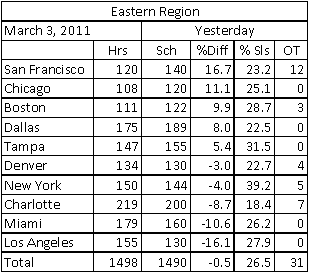
This is an illustration of the “Image” version of this report.
Report Labels
- Hierarchy Name (will appear at the top for “consolidated” users)
- Date for the report (yesterday’s date)
- Report Title – “Yesterday”
Report Columns
- Location – For “consolidated” users, will include all locations in the hierarchy selected to receive the alerts.
- Hrs – Actual Hours for the previous day, rounded to a whole number.
- Sch – Scheduled Hours for the previous day, rounded to a whole number.
- % Diff = [ ((Scheduled Hours – Actual Hours)÷ Scheduled Hours) x 100 ], rounded to 1 decimal.
- % Sls – Labor % of Net Sales for the location, rounded to 1 decimal.
- OT – Overtime Hours Actual for the location, rounded to a whole number.
 Related Topics