Week to Date Comp Sales to Last Year
This alerts displays Total Net Sales for the current week through the previous day, compared to the Total Net Sales through the same day last year. This report is sorted by “% Chg” (descending), then by “Location” (ascending).
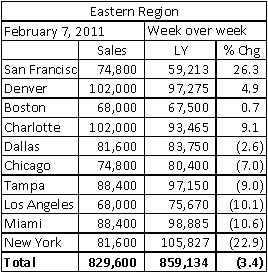
This is an illustration of the “Image” version of this report.
Report Labels
- Hierarchy Name (will appear at the top for “consolidated” users)
- Post Date for the current week
- Report Title – “Week over Week”
Report Columns
- Location – For “consolidated” users, will include all locations in the hierarchy selected to receive the alerts.
- Sales – Actual Sales for the week through the previous day, rounded to a whole number.
- LY – Last Year Same Day Sales for the week through the previous day, rounded to a whole number.
- % Chg = [ ((Sales – LY) ÷ LY] x 100 ], rounded to 1 decimal.
 Related Topics