Task Alert
This alerts displays a list of all tasks that were due for the previous day or prior days that have not been completed or canceled. The task list is sorted by Location, then by Date in ascending order.
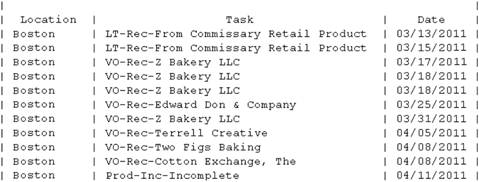
This is an illustration of the “Text” version of this report.
Report Labels
- Hierarchy Name (will appear at the top for “consolidated” users)
Report Columns
- Location – For “consolidated” users, will include all locations in the hierarchy selected to receive the alerts.
- Task (Description, see below for details)
- Date – Due Date for the incomplete task.
Note: For “consolidated” users, this report can be exceptionally long. Be sure that the data will be useful prior to selecting this report if you are a regional (multi-unit) manager.
 Related Topics