Inventory Posting Summary Calculations
Prior to completing the Post for a period, Net-Chef displays a box summarizing the inventory data for the period, as shown below.

These amounts are calculated as follows:
Period Purchases = [ Total Purchases {includes order surcharges} + Total value of Produced Recipes ]
This includes the value of all products and services purchased and recipes produced during the period.
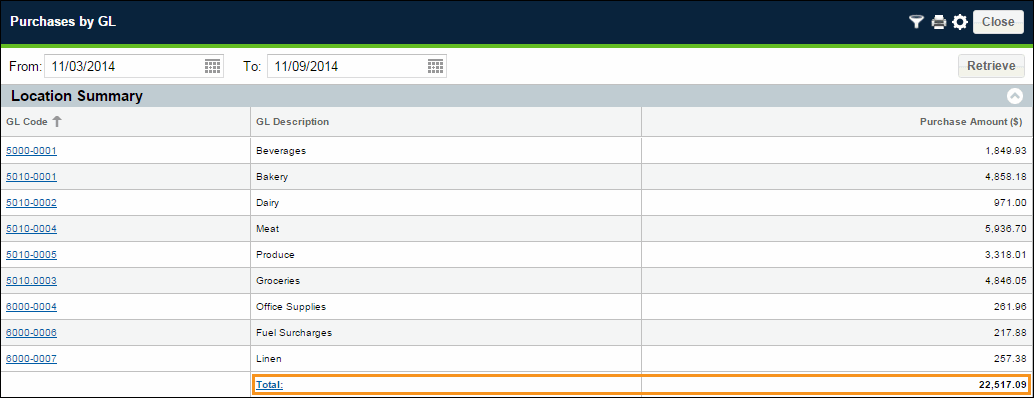
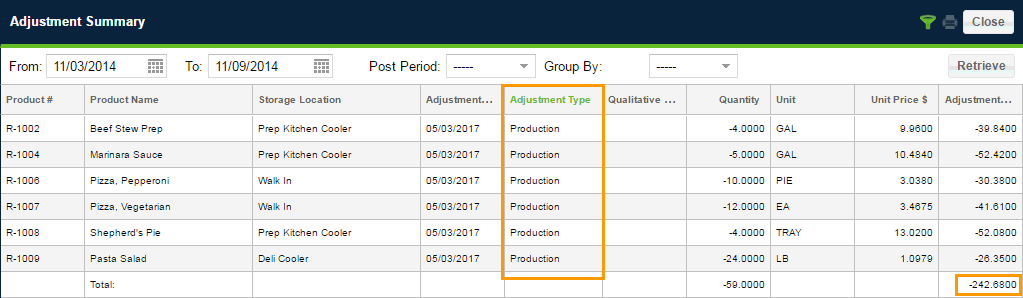
$ 22,759.77 = 22,517.09 + 242.68
Consumption = [ Beginning $ + Received $ – Physical $ ]
This includes the value of all products sold and adjusted during the period.
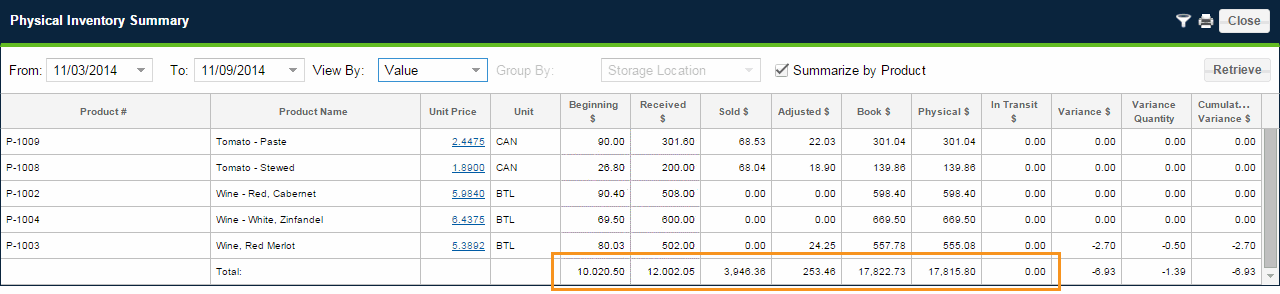
$ 4206.75 = 10,020.50 + 12,002.05 – 17,815.80
Ending Inventory = [ Physical $ + In Transit $ ]
This includes the value of products remaining in inventory and those products issued but not yet reconciled at the end of the period.
$ 17,815.80 = 17,815.80 + 0.00
The total value of Purchases can be verified by retrieving the Purchases by GL report for the post period date range and noting the Total in the Location Summary section.
For locations doing Production or Daily Prep, the total value of produced recipes can be verified by retrieving the Adjustment Summary report for the post period date range, setting "Filter by Transaction Type" = 'Production', and noting the report Total. (The values appear as negative because the recipes were adjusted in to inventory; use the positive value in the formula above.)
The rest of these values can be seen in the Physical Inventory Summary report. Retrieve the report for the post period and set "View By" = 'Value'.
 Related Topics