Budgets Applied
Budgeted values and calculations are used in the Profit & Loss reports, which compare actual sales and costs to the budgeted values.

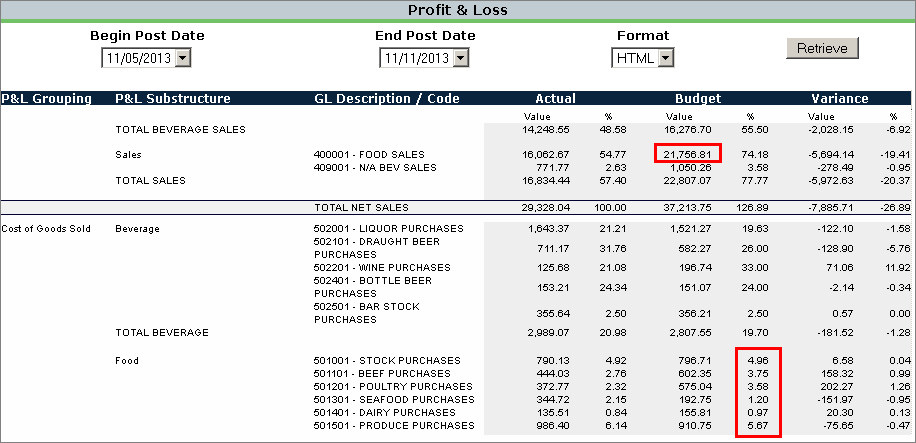
In the P&L report, the "Budget %" for a Cost of Goods account is multiplied by either by the Actual Value or Budget Value (based on preference settings) for the corresponding Sales account to calculate the Budget Value for that COGs account.
The Sales Forecasts screen will display the total "Budgeted Sales" value is broken down for each day by the percentage at the top of each column (derived from the "Projected Sales %" tab in the Enterprise Manager Location Details screen for that location).
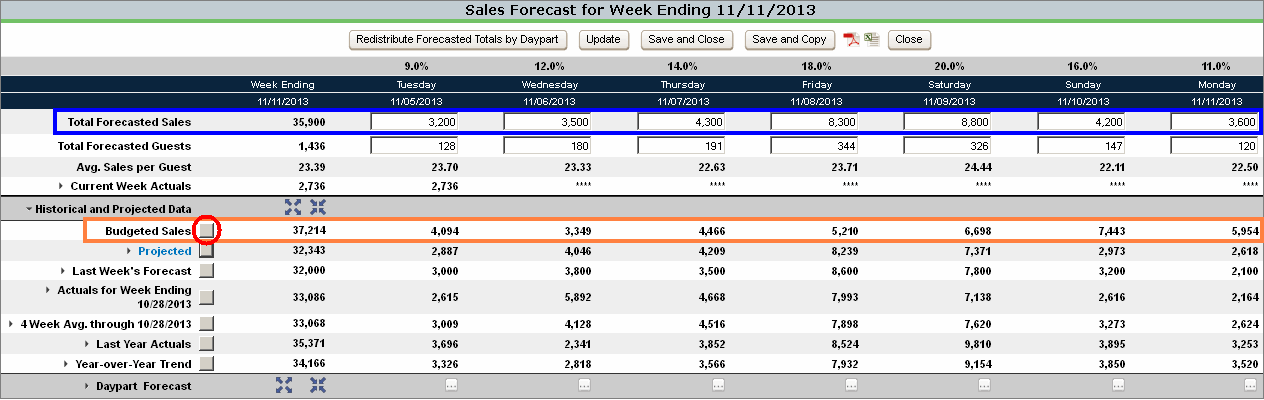
Budgeted sales can be used to populate the "Total Forecasted Sales" fields by clicking the command button to the right of the "Budgeted Sales" label.
On labor schedules, managers can use the total budgeted sales as a guide when creating weekly labor schedules.
 Related Topics